
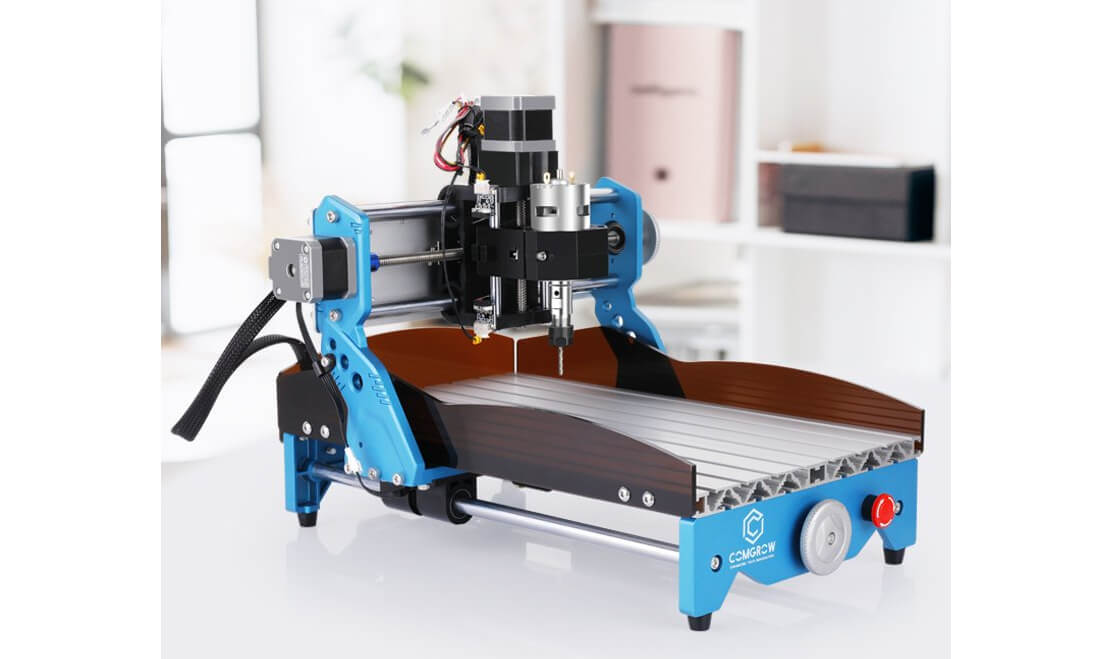
Choosing a CNC router for your small shop is about balancing footprint, cost, and performance.
Ideally, the CNC router should be compact enough to allow space for smooth operation and moving materials, while having a reasonable cutting area to make your desired products.
In this article, I’ll introduce to you some of the best small CNC routers available in the marketplace.
After a thorough examination of different CNC routers, I’ve come up with five CNCs that fit in a small shop.
These are also ideal beginner CNC machines if you are just getting into this hobby.
MellowPine is reader-supported. When you buy through links on my site, I may earn an affiliate commission at no extra cost to you.
Best CNC Routers for Small Shops
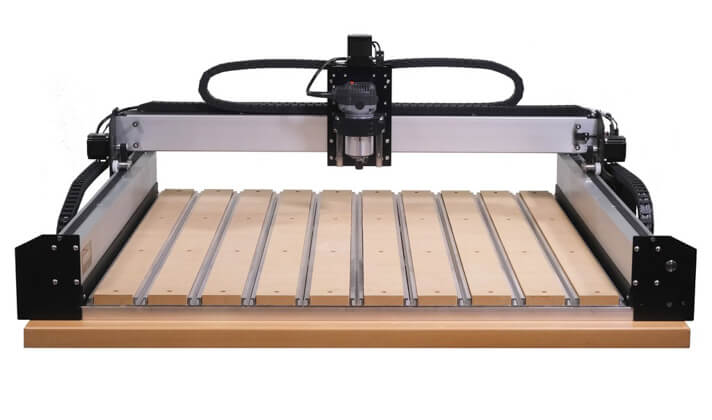
These are the best small CNC routers that are available on the market.
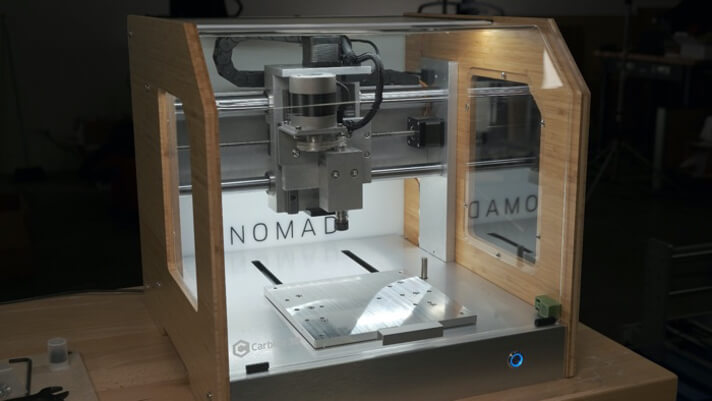
1. Nomad 3 CNC
| Parameter | Nomad 3 |
|---|---|
| Footprint | 19” x 17.5” x 17” |
| Work area | 8” x 8” |
| Workpiece thickness | 3” |
| Spindle | 9,000 – 24,000 RPM |
| OS capability | OS/X 10.14 and higher, Windows 8, 10, 11 (Intel/AMD) |
| Assembly | ~30 minutes |
| Warranty | 18 months |
Quick summary of Nomad 3
Nomad 3 from Carbide 3D is a desktop CNC machine, suitable for milling and designing prototypes.
It can mill on wood, wood composites, plastic, and metals like aluminum, brass, lead, copper, and steel.
You’ll have to add coolant while using hard metals, this is a tricky part because of its enclosure.
Size and build
With a footprint of 19” x 17.5”, it has a work area of 8” x 8” x 3” which is ideal for small workpieces.
Nomad 3 has a height of 17” from its foot to the top. It weighs 65 lbs and can be placed on most work desks.
It has an enclosure, which adds a layer of safety from the milling operation.
Nomad 3 is heavy considering its small footprint because of its rigid aluminum frame. This helps it mill better on metals.
Linear Motion
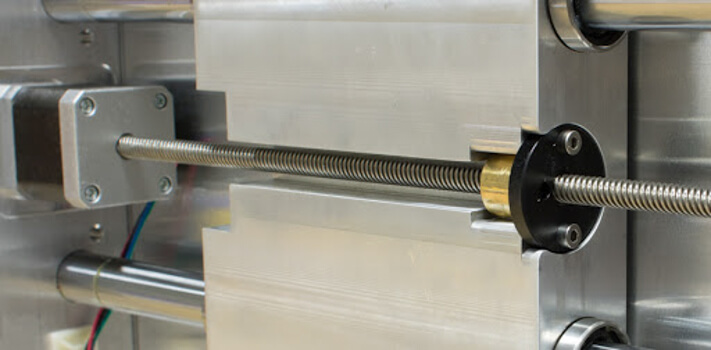
Nomad 3 is driven by a lead screw mechanism on all three axes. It uses anti-backlash nuts, which help achieve smooth operation.
Three stepper motors are used to control the router’s movement. A pair of linear rails support the gantry load and help achieve accurate linear motion.
Spindle
Nomad 3 uses a 130W spindle motor with a speed range of 9,000 – 24,000 RPM. It uses an ER-11 collet and can hold tools with a maximum of 7mm shank diameter.
Its high spindle speed readily allows you to gain more cuts per minute and improves the speed of milling operations.
Controller and electronics
Nomad 3 uses an Atmel 328 board flashed with GRBL firmware and is connected to the computer via USB cable.
Though the controller has four stepper drivers, Nomad 3 only uses three for its operation. This is because Nomad uses the same controller used by Shapeoko, which uses all four stepper drivers.
It uses homing switches on all three axes. This helps you easily home the router with its control software.
Nomad 3 has internal lighting. This, with the transparent enclosure, provides enhanced visibility while operating the machine.
Software
| Software | OS | Used for | Internet |
|---|---|---|---|
| MeshCAM | Windows 7, 8, 10, Mac 10.14 and higher | 3D matching | Offline |
| Alibre Workshop | Windows 7, 8, 10 | 3D CAD/CAM | Offline |
| Carbide Motion | Windows 8, 10, 11, Mac 10.14, and higher | Machine control | Offline |
| Carbide Create | Windows 8, 10, 11, Mac 10.14, and higher | 2D CAD/CAM | Offline |
| Carbide Copper | Windows, Mac, Linux, Android, IOS | CAM for PCB milling | Online |
Software provided with Nomad 3
Carbide 3D provides five software licenses with Nomad 3, these can fulfill CAD, CAM, Control, and Simulation operations of the Nomad 3 CNC router.
Carbide Create and Alibre Workshop are 2D and 3D CAD/CAM software that comes with Nomad.
Carbide Create is capable of designing 2D models and can generate G-code for those models. Alibre Workshop can do the same on 3D models.
MeshCAM, as its name denotes is a CAM software. It helps you create G-code from the design, this G-code can then be run on the Nomad 3 control software.
Carbide Copper is also a CAM software for making PCBs, it’s not OS-dependent and can run on any browser. It needs an uninterrupted internet connection for its operation.
Carbide Motion is the control software that comes with the Nomad CNC. It seamlessly integrates with all the other Carbide 3D software and is easy to use.
It can also simulate a preview of the toolpath before starting the milling process.
Overall, the software package provided by Carbide 3D is inclusive and allows you to realize the full potential of Nomad 3.
Assembly
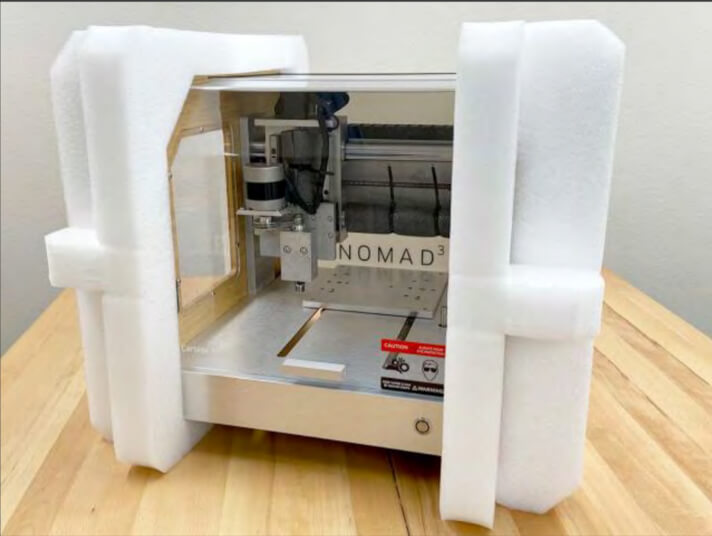
It comes in a pre-assembled form. The only work for you is to install the collet, wasteboard, and connect all the wires.
Other than that, you’ll have to spend some time configuring and adjusting the machine with the software.
Carbide 3D’s community website has good articles on how to assemble the router. Nomad 3 can be assembled and put to work in under 30 minutes.
Community and support
Carbide 3D has an active community, and they are active on YouTube, Reddit, Facebook, and Carbide 3D’s community website.
They provide excellent technical support through phone and e-mail for their customers.
For Nomad 3, Carbide 3D provides a warranty period of 18 months with a 30-day replacement policy.
Overview
Nomad 3 comes preassembled and contains all the tools, software programs, and accessories needed to start carving within an hour of opening the box.
Though Nomad 3 has the highest price on the list, You can use it to craft metal parts with precision and speed.
It is primarily designed to be a useful tool for hobbyists, engineers, and makers of custom products.
A more detailed review of this CNC router can be found here – Nomad 3 CNC Review [2023]
2.
| Parameter | BobsCNC Quantum |
|---|---|
| Footprint | 32″ x 39″ x 21” |
| Work area | 24” x 24” |
| Workpiece thickness | 3.8” |
| Spindle | Makita RT0701C 10,000 – 30,000 RPM |
| OS capability | Windows, Mac, Linux |
| Assembly | 1 day |
| Warranty | 90-days |
Quick summary of BobsCNC Quantum
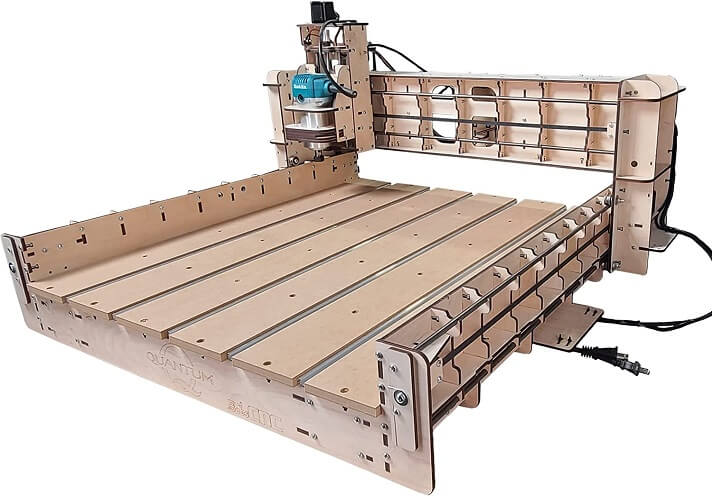
BobsCNC Quantum is an affordable CNC router machine, best suited for woodworkers.
Quantum for the most part is made up of materials like wood, plastic, and acrylic. So it doesn’t have a rigid build and is not suited for milling on metals.
However, it performs well on materials like wood, wood composites, plastics, acrylic, and foam.
Size and build
BobsCNC Quantum has a footprint of 36” x 40”, with a work area of 24” x 24” x 3.8”.
Quantum has a height of 22” from its foot to the top. It weighs 50 Ibs and can be placed on a standard 50” x 40” work desk.
It comprises a wooden frame/chassis, made from laser-cut baltic birch plywood. Though a durable material, it will limit your feed and speed rates.
Quantum may get affected by climatic conditions, the plywood frame can warp because of humidity and temperature.
Linear Motion
Quantum uses a GT2 belt drive on the X and the Y-axis. Belt drives are fast but are less responsive than other drive mechanisms.
It uses a dual drive to achieve smooth machine movement along the X-axis. This also prevents racking.
The Z-axis uses a trapezoidal 8mm (Tr8) acme rod mounted with an acme nut, which makes it smooth and rigid to support the weight of the spindle.
Spindle/Router
BobsCNC Quantum comes with a 1.25hp Makita RT0701C router and has a speed range of 10,000 – 30,000 RPM.
Makita RT0701C spindle has lightweight aluminum construction. It can hold tools with a shank size of ¼”. This spindle alone weighs around 4 Ibs.
Additionally, it has dual insulation that allows you to use it for dusty operations.
Controller and electronics
Quantum uses an Arduino Uno board flashed with GRBL 1.1 firmware as its controller and is connected to the computer via a USB cable.
The machine movement is achieved by four NEMA 17 stepper motors, each with a holding torque of 76 oz-in.
Quantum uses limit switches on all three axes that prevent the gantry from crashing into the frame.
Software
BobsCNC does not provide any software with Quantum. But you can pair it up with different software, like Fusion 360, MeshCAM, Easel, F-engrave, and more.
BobsCNC sells some software licenses on its website, but only for Windows OS.
Quantum’s controller accepts standard G-codes. Hence Quantum can run G-codes from most third-party CAM software.
For sending G-code files, BobsCNC recommends Universal Gcode Sender (UGS) and for CAM operations, they suggest F-engrave and MakerCAM. All these software are open-sourced and free to use.
Upgrades
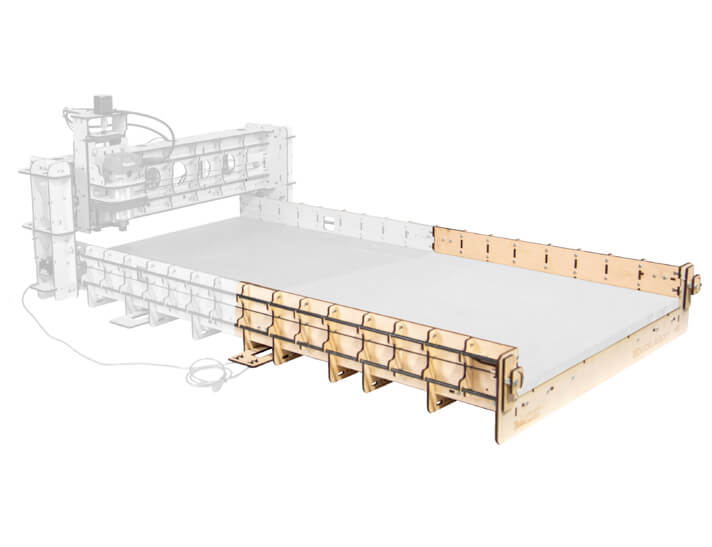
An extension upgrade kit for Quantum is available on BobsCNS’s website. This kit helps you convert Quantum to Quantum Max, as the only difference between them is the work area.
If you already have Quantum and want to increase the work area, you should consider this upgrade.
If you are looking for a larger work area, then directly getting Quantum Max is the best option as the extension kit costs $450, which is more than the price difference of $300 between Quantum and Quantum Max.
This upgrade will increase the X-axis by 26.5”, increasing the work area to 50.5” on the X-axis. With this extension upgrade, Quantum will have a new footprint of 63” x 40”.
The extension kit has a separate 30-day return policy and a 90-day warranty period.
Assembly
Quantum router doesn’t come preassembled, it comes in parts but can be assembled within a day.
BobsCNC provides a user manual, that has detailed illustrations and a step-by-step guide about its assembly.
The boxes are labeled for ease of assembly. Several assembly videos are there on YouTube, it’ll help you fasten up the process.
BobsCNC also provides a separate assembly guide for the Quantum upgrade kit.
Community and support
BobsCNC’s website has a community page, and it has all the details of the official community handles of BobsCNC.
They have members-only Facebook groups for each product and extend significant support to their customers through these groups.
Their website also has a support page through which details about getting started, manuals, troubleshooting, FAQs, warranty & return conditions, and much more are available.
For all CNC router machines under the Quantum series, BobsCNC provides a 90-day warranty with a 30-day return period.
Overview
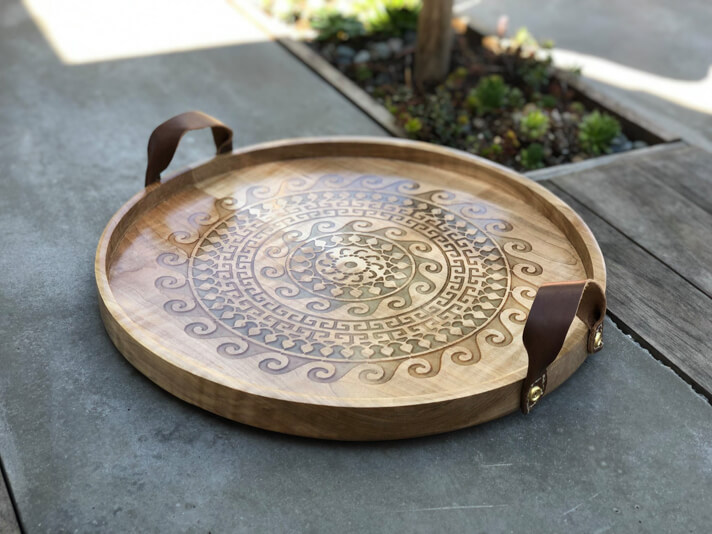
Quantum can do wonders in wood carving, It can carve intricate 3D designs on wood. You can use Endmill, V-Carving, Ballnose, and Straight bits with its spindle.
Cutting on wood produces a lot of dust, you must make use of a dust collection system. Else, the dust will impede the router’s continuous operation.
Quantum is relatively cheap and can mill efficiently on softer materials like plastic and wood, wood composites.
No products found.
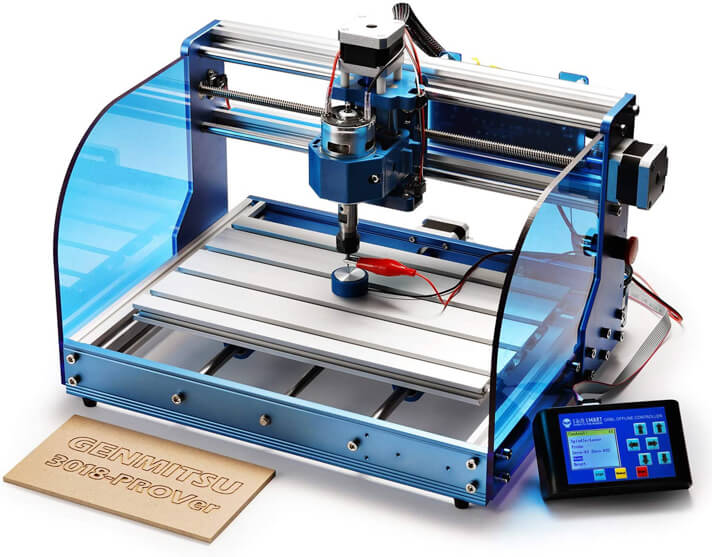
3. SainSmart Genmitsu 3018-PROVer
| Parameter | Genmitsu 3018-PROVer |
|---|---|
| Footprint | 16.5” x 13.5” x 11” |
| Work area | 11.8” x 7.1″ |
| Workpiece thickness | 1.4” |
| Spindle | 775 type, 10,000 RPM, 120W |
| OS capability | Windows, Mac, Linux |
| Assembly | 30 minutes |
| Warranty | No warranty |
Quick summary of Genmitsu 3018-PROVer
Sainsmart’s Genmitsu 3018-PROVer is a compact CNC router and is the successor of Genmitsu 3018-PRO. It is suited for milling a range of materials like wood, wood composites, acrylic, plastic, PCB, and MDF.
It is a great CNC router for beginners, hobbyists, and small businesses to step on.
The PROVer series has two variants available, the 3018-PROVer and the 3018-PROVer MX3. PROVer can be converted to a PROVer-MX3 just by replacing its controller.
The only difference is that PROVer runs on GRBL and MX3 runs on Mach 3 control software.
Size and build
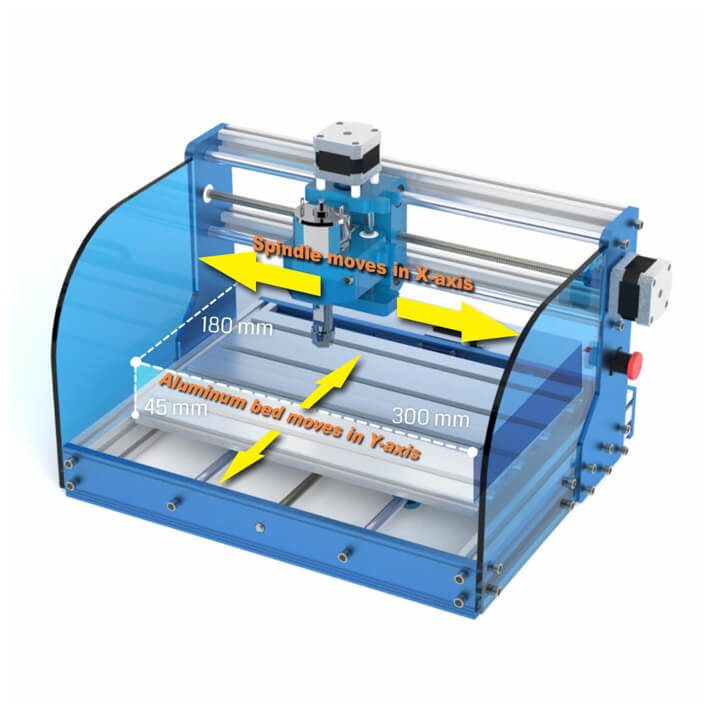
Sainsmart’s Genmitsu 3018-PROVer has a footprint of 16.5” x 13.4” and a work area of 11.8” x 7.1”.
It has a Z-axis travel of 1.4”. It has a height of 11” from its foot to the top. It weighs 21.9 lbs and can sit comfortably on a 20” x 20″ workbench.
Genmitsu 3018-PROVer has a frame made of aluminum. This adds to the rigidity of the machine.
It has a transparent enclosure that keeps the chips within. Additionally, the bottom rubber bushes help absorb vibration and provide a stable operation.
Linear Motion
Genmitsu 3018-PROVer uses a lead screw mechanism on all three axes to move the axes. It’s prone to backlash error but is quite good for engraving operations.
This machine has a unique Y-axis movement. Rather than moving the gantry, this router moves its work bed to achieve Y-axis movement.
Spindle
Genmitsu 3018-PROVer comes with a Genmitsu 775 spindle which has a maximum speed of 9,000 RPM.
The spindle is mounted onto a 42mm mount and comes with a pre-installed ER11 collet.
Genmitsu 775 spindle is not powerful enough to carve on aluminum but Genmitsu offers a swap-in spindle upgrade that will let you carve on aluminum.
Controller and electronics
Genmitsu 3018-PROVer is driven by three NEMA 17 stepper motors with a maximum holding torque of 2.2 lb-in.
It uses an Arduino board flashed with GRBL 1.1 firmware as its controller. Optoisolators isolate the signals and prevent the board from high currents.
The controller comes with a LED display and can work in a stand-alone fashion. It can run G-code directly from a memory card.
You can also connect it to a computer via a USB cable for more versatile control.
The CNC router has limit switches on all three axes. It uses a contact-based limit switch mechanism.
For zeroing the Z-axis Genmitsu 3018-PROVer it comes with a Z-probe, which makes the job easy for you.
Software
With Genmitsu 3018-PROVer, Sainsmart provides a free three-month Carveco Maker subscription. This software can perform CAD/CAM operations.
After the expiry of these three months, you’ll have to subscribe with a monthly charge of $15 if you wish to continue using Carveco Maker.
For sending G-codes to the controller, you can use Universal Gcode Sender or GRBL candle software. Both are free to use.
Upgrades
Genmitsu 3018-PROVer can be upgraded with a 3040 extension kit. This extends the machine movement to 14” at the Y-axis and is priced at $60.
Sainsmart offers a spindle upgrade for the Genmitsu 3018-PROVer. We can replace its default Genmitsu 775 spindle with a Genmitsu 775M spindle.
This spindle has a speed of 20,000 RPM and enables the router to do aluminum engraving.
Sainsmart sells a mount upgrade. It is an aluminum spindle mount and replaces the default plastic mount that lacks the rigidity to hold the spindle for aluminum milling.
For engraving operation, a laser module kit is sold by Sainsmart for its Genmitsu 3018-PROVer machine.
Assembly
You can buy Sainsmart Genmitsu 3018-PROVer as a DIY kit or assembled and ready-to-go kit.
The fully assembled version can start cutting within 30 mins of opening the box but will cost you around $150 more than the unassembled version.
They have detailed explanations on their website about the assembly of the CNC router and