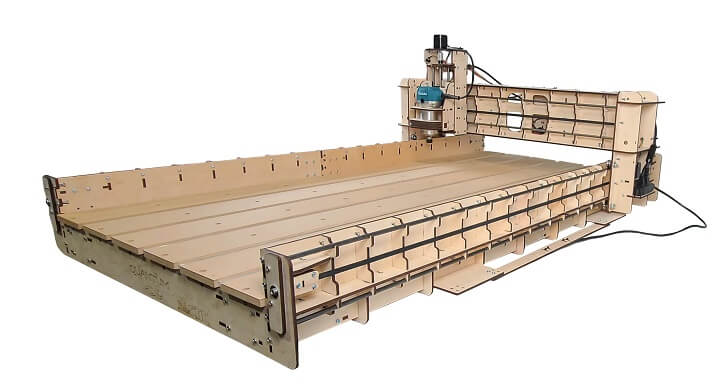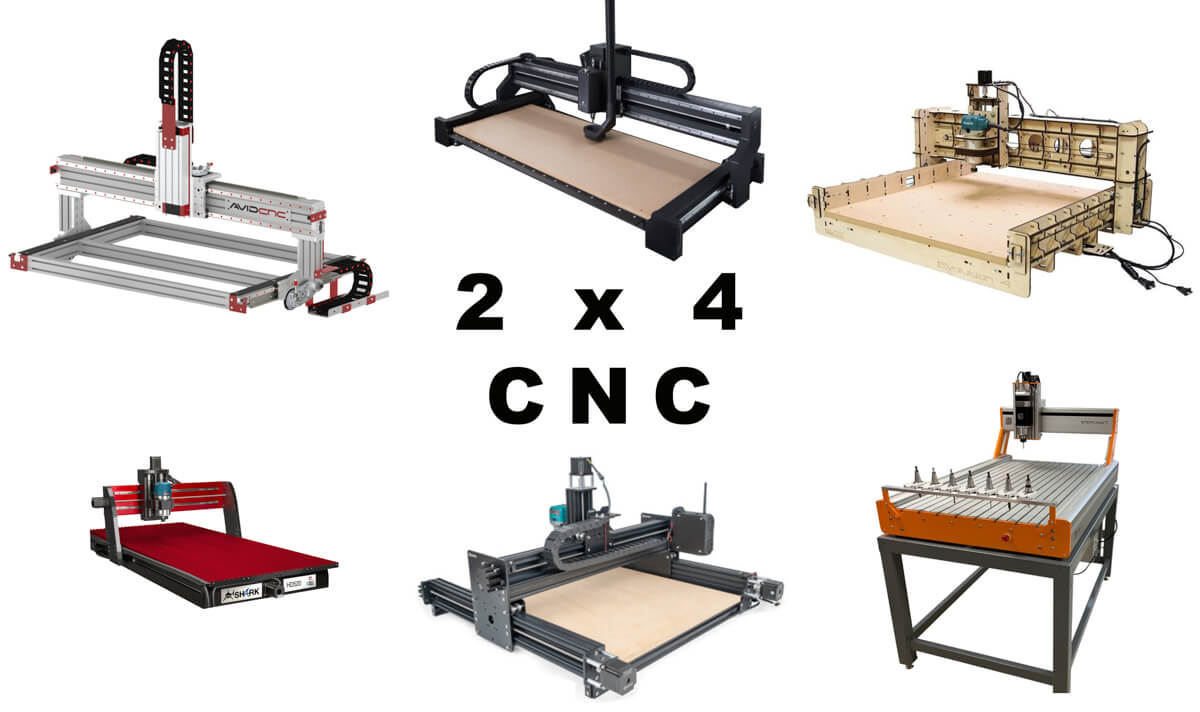
If you are looking for a CNC machine that can work on a 4’x2′ sheet of material, this guide will help you in choosing the CNC router you need.
4×2 is considered a medium-sized CNC router, and you have several good choices in this category.
I’ve listed 6 of the best 2×4 CNC router kits available today in this guide.
They vary a bit in terms of price owing to the different speeds, and power of each machine.
I evaluated these CNC routers on parameters such as cutting area, linear motion components, router/spindle, software, dust shoe, price, warranty, and customer support.
MellowPine is reader-supported. When you buy through links on my site, I may earn an affiliate commission at no extra cost to you.
Table could not be displayed.1. Avid CNC PRO4824– Best Overall 2×4 CNC Router
| Features | Avid CNC PRO4824 |
|---|---|
| Footprint | 40 ¾” x 67” |
| Cutting area | 49 ½” x 24” x 8”/12” |
| Linear motion | PRO rack and pinion (X and Y-axes) and ball screws (Z-axis) |
| Spindle/Router | Bought Separately |
| Software | Mach4 with LayCAM add-on (purchase separately) |
| Warranty | One-year |
| Dust shoe | Not included in the kit |
Quick summary of Avid CNC PRO4824
If there is a 2×4 CNC router that balances performance and price perfectly then it’s this CNC router.
The Avid CNC PRO4824 is perfect for small businesses that need to move volume at an affordable cost.
PRO4824 CNC kit has to be bought along with the recommended electronics kit, software, and accessories.
Avid CNC lets you choose components and custom-build your CNC router, and your final price will vary considerably depending on the components you choose.
Size and Build
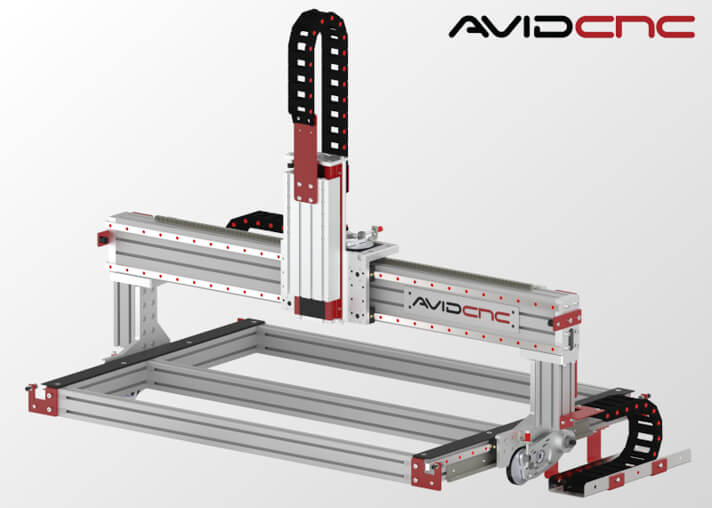
The PRO4824 CNC router kit has a 40 ¾” x 67” footprint that gives you a cutting area of 49 ½” x 24” with a standard Z-axis travel of 8 inches.
Avid CNC offers extension kits to expand the frame of PRO4824. You also have the option to increase Z-axis travel up to 12 inches.
You can use a spoilboard or vacuum hold down to make the workbed for workpiece holding.
Its chassis is made of heavy-duty aluminum extrusions and steel components, which give the CNC a solid foundation for challenging projects.
The gantry of PRO4824 has a width of 67 inches, which can be extended to 77 inches at an extra cost. The extended gantry is helpful for dual Z-axis operation.
The best thing about Avid CNC routers is their modular design which lets you upgrade this 2×4 CNC router to either a 4×4 CNC router or 4×8 CNC router down the road by buying extra components.
Linear Motion
PRO4824 CNC router uses PRO rack and pinion with linear rails to provide linear motion in X and Y-axes, which gives you a resolution of 0.0005 inches.
Its Z-axis is ball screw driven and has a resolution of 0.0002 inches.
Rack and pinion drive systems give you incredible speeds while working without compromising precision.
Spindle
Avid CNC offers two stepper motor versions to drive the axes of PRO4824, the NEMA 23 and the NEMA 34.
For light production work, I suggest the NEMA 23 type stepper motor. Using Avid CNC electronics, you can get a maximum rapid traverse of 500 ipm and a maximum cutting speed of 250 ipm.
If your business requires high production rates, then a NEMA-34 type stepper motor is suitable for you. You can get a maximum rapid traverse of 1,000 ipm and a maximum cutting speed of 500 ipm.
Similarly, you have the option to choose between two spindles for the Avid PRO4824 CNC machine.
I suggest the 4 hp (3 kW) spindle for small businesses and the 8.7 hp (6.5 KW) spindle for maximizing production.
The 4 hp spindle has a material removal rate of 95 cubic inches per minute but the 8.7 hp spindle can remove material 2.3 times faster, so if you need to make deep cuts fast you should go for the larger spindle.
Both are plug-and-play VFD spindles and can be easily connected to the Avid CNC controller without any additional components.
Controller and Electronics
Avid CNC provides you the option to customize your PRO4824 router according to your production requirements.
You can either purchase the plug-and-play Avid CNC electronics kit or custom-build the electronics for the PRO4824 CNC machine.
Hobbyists and home-based businesses only need the Plug and Play NEMA 23 CNC Control System.
If time is a critical factor for you in your production process, get the NEMA 34 CNC control system for faster milling.
To complete the electronics build, you will need stepper motors with an appropriate controller, auto Z and corner finding touch plate, and Pepperl + Fuchs proximity sensor kit.
If you get the kit from Avid CNC, the controller, breakout boards, stepper motor drivers, and power supply modules are housed inside an industrial NEMA-type enclosure.
Software
Avid CNC recommends Mach4 CNC motion control software for PRO4824 CNC machines.
Mach4 is an industrial-grade CNC control software and is quite responsive for use with large G-code files.
It is a robust software program and fast enough to provide instructions to make complex cuts quickly and allows you to control the CNC remotely.
Mach4 is compatible with computers running on Windows 7 or higher OS, and with the LazyCAM add-on, the software can perform CAM operations.
It has an easy-to-operate user interface. Additionally, you will get good community support to resolve your queries.
You can use any CAD/CAM software and use the G-code from it on Mach4.
Alternatively, you can use other popular software that can run ethernet Smoothstepper controllers like LinuxCNC.
Assembly
PRO4824 CNC machine ships as parts, and it takes roughly 40 hours to set up the machine completely.
Avid CNC provides good resources, which are helpful to complete the assembly of the PRO4824 CNC router.
Community and Support
Avid CNC has a large online official forum and several unofficial forums of active users, which helps resolve your Avid CNC-related issues quickly.
PRO4824 CNC comes with a one-year warranty against manufacturing defects.
Avid CNC provides excellent US-based customer support, and you can contact them via call or email.
Overall, the Avid CNC PRO4824 is my best pick among all the machines on this list.
2. Ooznest WorkBee Z1+ CNC Router
| Features | Ooznest Workbee Z1+ |
|---|---|
| Footprint | 39.37” x 59.05” |
| Cutting area | 30.31” x 50” x 3.46” |
| Linear motion | Lead screw |
| Spindle/Router | Not included in the kit |
| Software | WorkBee Control |
| Warranty | One-year |
| Dust shoe | Not included in the kit |
Quick summary of Ooznest Workbee Z1+
Ooznest released the WorkBee Z1+ CNC router in August 2021.
It is the successor of the highly popular original WorkBee CNC router from Ooznest.
WorkBee Z1+ comes with improved features that make it an excellent choice for hobbyists and home businesses that need a 2’x4′ cutting area.
The CNC machine with router and mounting head, dust shoe, Vcarve Pro software, and essential accessories will cost you around $4,000.
If you already own an original WorkBee CNC router, you can upgrade it to WorkBee Z1+ using the kit provided by Ooznest.
Size and Build
The all-new WorkBee Z1+ CNC router kit is offered in six different size options.
Its 39.37” x 59.05” (1000 mm x 1500 mm) option provides you a cutting area of 30.31” x 50”, which is a few inches larger than 2’x4′.
Although the CNC router has a maximum Z-axis travel of 3.46 inches, the maximum cut depth you can achieve depends upon the spoilboard thickness.
You will need a table size of around 4’ x 6’ to keep this CNC machine.
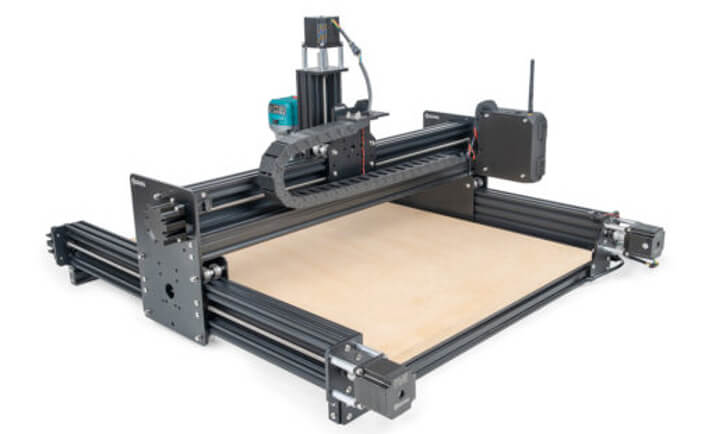
The chassis is made of anodized aluminum extrusion. You can choose either black or clear coat options for it.
Its 6 mm anodized aluminum plates and A2 stainless steel bolts tie the frame extrusions with good rigidity and give it sturdy build quality.
Linear Motion
WorkBee Z1+ CNC includes an 8 mm lead screw system with thrust bearings to drive all axes.
The polycarbonate V-wheels run over V-slot extrusions to move the gantry on Y-rails, V-wheels need less maintenance than other guide mechanisms.
Overall, the rigidity and linear motion components of the WorkBee Z1+ offer accuracy of 0.003 inches.
Spindle
The axes of WorkBee Z1+ are driven by NEMA-23 type stepper motors, which have a holding torque of 175 oz-in.
These stepper motors are powerful enough and give you a maximum feed rate of 100 ipm, and their dual-drive Y-axis prevents the racking of the gantry.
Ooznest offers two router options to pair with your WorkBee Z1+ CNC at an additional cost. If you are looking for a router with a US power cord, I suggest Mafell FM 1000 milling motor.
It is a 1 kW manual speed control router with a 4,000 – 25,000 RPM variable speed range.
Alternatively, while purchasing WorkBee Z1+, you have the option to select one of the 63mm, 65mm, or 69mm spindle mounts to use with a router of your choice.
Controller and Electronics
The core of the WorkBee Z1+ controller is a Duet2 board with RepRapFirmware v3.3 flashed onto it.
Its controller is housed inside a case mounted onto the gantry and has multiple cooling fans to keep the controller cool.
You can choose from ethernet or wifi connectivity options while purchasing the WorkBee Z1+ CNC kit.
The wifi option also lets you connect your mobile or tablet with a WorkBee Z1+ CNC machine.
Although you can transfer the G-codes using an SD card, the connectivity module provides more convenient file transfer than SD cards.
WorkBee Z1+ has limit switches on all axes, which helps to home the CNC machine and prevent the gantry from crashing into the frame.
It has a Meanwell HLG Series Power supply, which is dust resistant, and available in EU, UK, and US power cord options.
The E-stop button is integrated with the power supply to stop the machine immediately in case of emergencies.
Software
The WorkBee Z1+ CNC kit comes with built-in WorkBee control software, accessed through a browser-based interface.
To use its control interface, you can log in to the software through a computer or mobile.
Make sure that your computer or mobile and CNC machine are connected to the same wifi network.
Alternatively, the CNC machine can be connected to a computer via an ethernet cable.
WorkBee control software is only for controlling the machine, and you will need separate CAD/CAM software to create G-codes for your projects.
Assembly
WorkBee Z1+ arrives as parts in two different shipping boxes, and it will take around 12 hours to assemble the CNC machine completely.
Ooznest provides good assembly guides and resources to make the task easy for you.
Community and Support
Ooznest has a large online community forum of active users where you can discuss CNC-related queries.
They also have Ooznest Learning Portal, an excellent place to get ideas for your projects and tips to troubleshoot Ooznest CNC machines.
WorkBee Z1+ comes with a one-year warranty against parts and manufacturing defects.
Ooznest has excellent UK-based customer support, and you can contact them via call or email.
Overall, the Z1+ CNC router is a relatively affordable option in this list and can do the job for you if you’re a hobbyist.
More detailed review of this CNC router- Workbee Z1+ CNC Review [2023]
3. Next Wave Shark HD520– 2×4 CNC for Woodworkers
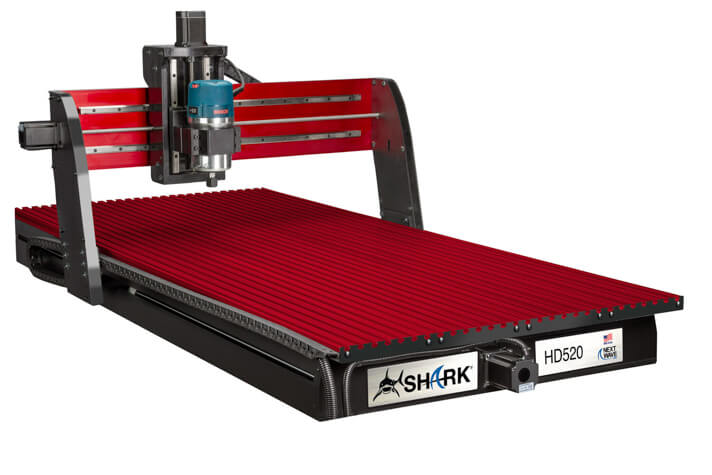
| Features | Next Wave Shark HD520 |
|---|---|
| Footprint | 63” x 36 ¼ “ |
| Cutting area | 25’’ x 50’’ x 7” |
| Linear motion | Lead screws (all axes) |
| Spindle/Router | Not included in the kit |
| Software | Vectric VCarve Pro |
| Warranty | Two-year |
| Dust shoe | Not included in the kit |
Quick summary of Next Wave Shark HD520
Shark HD520 is the largest CNC machine offered by Next Wave CNC.
Whether it’s your home or for a production environment, Shark HD520 includes almost everything to meet all your milling needs.
The HD520 is designed and built with CNC woodworking as its prime focus and quite expectably this CNC router is most popular among woodworkers.
Size and Build
HD520 CNC has a footprint of 63” x 36 ¼ “, and its workbed lets you hold workpieces with a maximum size of 28’’ x 63’’.
It has a cutting area of 25’’ x 50’’ and can cut workpieces of thickness up to 7 inches.
The chassis is made of industrial-grade aluminum interlocked with stainless steel.
It’s heavy-duty workbed integrates InterLoc T-slots, giving you endless possibilities for workpiece clamping.
The steel-reinforced gantry has steel-encased legs, which offer good rigidity for challenging production environments and excellent vibration damping.
Linear Motion
All axes of Shark HD520 are driven by lead screw systems, which include an anti-backlash nut to compensate for the inherent axial movement between the nut and the screw.
The gantry and Z-axis assembly have linear rails which guide the movement in X and Z-direction.
Movement in Y-axis is guided by heavy steel polished shafts that include bearings to maximize rigidity.
Spindle
Each axis of Shark HD520 is equipped with a NEMA-23 type stepper motor.
Next Wave does not supply a router/spindle with the kit but provides an aluminum router mount with the CNC kit.
You need to purchase a router/spindle separately that meets the need of your requirements.
HD520 CNC is reinforced to handle Bosch 1617 (2 HP), DeWalt DW618 (2 ¼ HP), Porter Cable 690, and 890 series routers up to 2 ¼ HP.
You can also use the water-cooled spindle from Next Wave CNC.
It is a 2 HP (1.5 kW) brushless spindle and can achieve a maximum speed of 24,000 RPM. You can plug it into a 110 V (15 A) standard wall socket.
Shark HD520 includes a router power control unit, which has a power outlet for the router cable.
If you wish to do CNC wood turning, you can get the 4th rotary axis add-on from Nextwave, which works seamlessly with the HD520.
Unlike most other CNC brands, Nextwave has its own laser kit, which you can integrate with this CNC router.
Controller and Electronics
The controller is divided into two, the main controller box and a pendant controller.
It has ports for the router power control unit, stepper motor cables, and homing switches. You can plug it into a standard 120 V socket.
The pendant controller is for motion control, and it is connected to the main controller box. It provides a convenient way of jogging your CNC router.
It also has a USB port that lets you plug in a USB stick to run G-code files directly without a computer.
As for control electronics, the X and Y axes of Shark HD520 include homing switches for easy homing.
Software
Shark HD520 CNC comes with Vectric VCarve Pro design software included.
VCarve Pro costs hundreds of dollars if you buy it separately and you should consider this cost saving while comparing it with other CNCs in this list.
It is a CAD/CAM software capable of creating 2D designs and 2.5D toolpaths and must be purchased separately.
Although you cannot create 3D designs with VCarve Pro, it lets you import 3D models created using other software like Fusion 360.
VCarve Pro requires a computer running with Windows Vista or a higher operating system having a minimum of 4GB RAM.
The perpetual license of this powerful software costs you roughly $700.
Additionally, it comes with Ready2Control control software. It has the Virtual Zero unlimited feature, which maps the entire workpiece surface with dynamic reference points.
Hence the software lets the router keep a constant cutting depth on intricately shaped or oddly shaped workpieces.
Assembly
The pre-assembled base and gantry, and the necessary hardware of Shark HD520 arrive in different boxes.
The assembly is quite straightforward and hassle-free but you will need two people two unpack and lift the preassembled gantry and base.
After lifting out from the boxes, you need to attach the gantry to its base and then connect the pendant controller, router power control unit, and electronics to the controller box.
Next Wave provides good assembly instructions, and it will take around 1 hour to set up the CNC machine.
Community and Support
Next Wave has two online community forums-CNCSharkTalk and nextwaveautomation forum.
CNCSharkTalk is owned and managed by Rockler while the Nextwaveautomation forum is owned and operated by Nextwave CNC.
Both are highly active forums offering plenty of resources and support for Shark CNC owners.
Shark HD520 includes a two-year warranty on parts and lifetime technical support from Next Wave.
Overall, the Shark HD520 is the whole package.
It gives you all the tools you need to get your CNC business rolling without any hassles.
This is a great 2×4 CNC router kit if you primarily work with wood and wood-related materials.
No products found.
A more detailed review of this CNC router can be found here- Shark HD520 CNC Review [2023]
4. X-Carve Pro 2×4 CNC Router
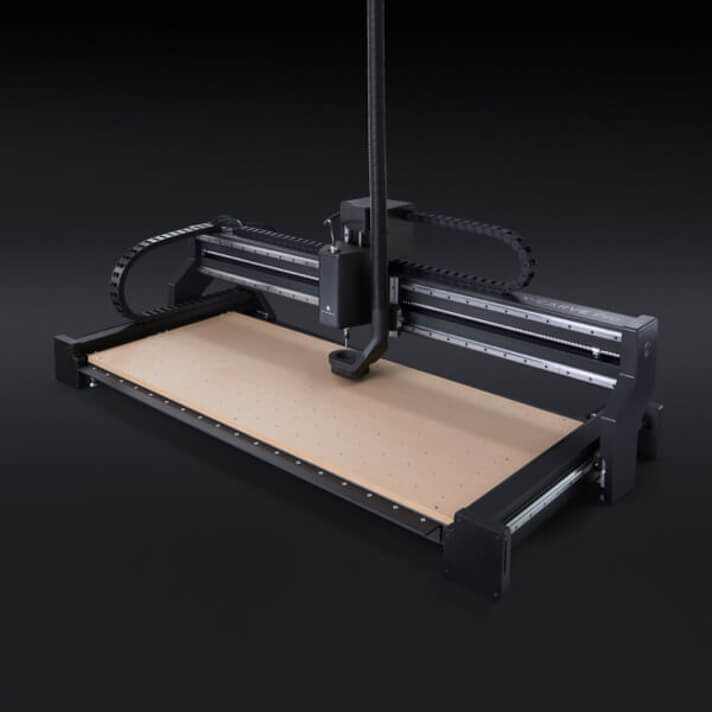
| Features | X-Carve Pro 2×4 |
|---|---|
| Footprint | 65.75” x 31.6” |
| Cutting area | 4’ x 2’ x 5” |
| Linear motion | Ball screws (all axes) |
| Spindle/Router | 2 HP proprietary VFD spindle |
| Software | Easel Pro |
| Warranty | One-year |
| Dust shoe | Integrated with spindle |
Quick summary of X-Carve Pro 2×4
Inventables is a highly popular CNC brand, and the X-Carve is their most popular CNC router.
The X-Carve Pro is their offering for small businesses, and it is a completely different CNC compared to X-Carve.
The Pro is available in 4×2 and 4×4 cutting area options, and both share the same gantry and air-cooled spindle.
Size and Build
X-Carve Pro 4 x 2 has a 65.75” x 31.6” footprint and offers you a cutting area of 4’ x 2’, with a weight of around 275 lbs.
Inventables recommends a 6’ x 3’ table for this CNC machine. You also need some space to place its main controller box underneath, so you should consider at least a 36” tall table.
Its gantry has a 5” clearance from the workbed, which lets you cut workpieces with a maximum thickness of 4 inches.
The chassis is made of powder-coated aluminum C-bars, and the thick aluminum extrusions underneath the workbed give it a sturdy foundation.
It also has six leveling feet underneath the extrusions to keep the workbed level on uneven surfaces.
The workbed is made of MDF with threaded inserts for workpiece holding.
Linear Motion
X-Carve Pro 4 x 2 uses ball screws with 25 mm rods to drive all axes, which have less backlash compared to lead screw systems.
The ball screws are hidden in the aluminum C-bars, which prevent dust and debris from getting into them.
It has linear rails to guide motion on all axes. With this good build quality, X-Carve Pro 4 x 2 gives you a repeatability of 0.001 inches.
Spindle
X-Carve Pro 4 x 2 CNC machine uses four NEMA 23 type stepper motors, with a holding torque of 292 oz-in, to drive lead screws on all axes.
You can achieve a maximum rapid traverse of 300 ipm and cutting speed up to 162 ipm on soft materials.
The X-Carve Pro 4 x 2 CNC kit includes a 2 HP proprietary VFD spindle, which offers a speed range between 8,000-24,000 RPM.
It is air-cooled, which allows you to run it for long durations.
Controller and Electronics
The controller box houses a GRBL-based controller board, power supply, heat sinks, and cooling fans and can be placed underneath the table.
In addition to the main controller, you get a pendant-like controller.
Inventables calls it the ‘HMI’, which stands for Human Machine Interface, and you can use it to pause, resume, and reset the cutting process.
The HMI also has a USB port to connect X-Carve Pro to a computer for transferring G-code and controlling its operation.
You can also connect the Z-probe to HMI, which lets you reset the Z-axis whenever you change the cutting tool.
X-Carve Pro 4 x 2 has homing switches on all axes, letting you home the device with a single tap.
Software
X-Carve Pro 4 x 2 comes with Easel Pro software, which is an all-in-one CNC software. It lets you perform both CAD/CAM and CNC motion control operations.
It is a cloud-based software that requires an active internet connection only to save and load your projects. Once it is loaded, you can work offline.
Easel Pro is compatible with computers running on Windows 7 or higher, Ubuntu 18.04 or higher, OR macOS 10.10 or higher operating systems.
Its tiling feature divides large designs into small sections.
Tiling lets you mill materials with an area larger than the cutting area (2’x4′) of the CNC router.
You can mill a full-size 4’x8’ sheet on this CNC by making use of the open design combined with tiling.
The CNC kit comes with a three-year license of Easel PRO, which needs to be renewed after the first 3 years. Its annual subscription costs you roughly $156.
Easel Pro can create 2D designs, and for 3D modeling, you can use other software like Autodesk Fusion 360.
Once you create a G-code of your 3D design, you can import it into Easel Pro for 3D carving using X-Carve Pro 4 x 2 CNC machine.
Assembly
The X-Carve Pro 4 x 2 CNC ships as a router kit with well-labeled shipping boxes and pre-assembled parts.
Inventables provide easy-to-understand assembly instructions, and with this, you can complete the assembly in under three hours.
Community and Support
Inventables has a large online community forum of active users, which is a highly useful aspect for a CNC owner.
X-Carve Pro comes with a one-year limited warranty and can be extended to three years for an additional cost of around $500.
Inventables offers excellent customer support to their customers, and you can reach the support team via call or email.
The biggest advantage to buying the X Carve Pro is the highly active community around the brand, which gives you continued support and easy troubleshooting as a user.
More detailed review of this CNC router- X Carve Pro CNC Router [2023]
5. Bobs Quantum Max CNC Router